EKS Workload Identity: IRSA, OIDC Token Exchange, and When to Use Pod Identity
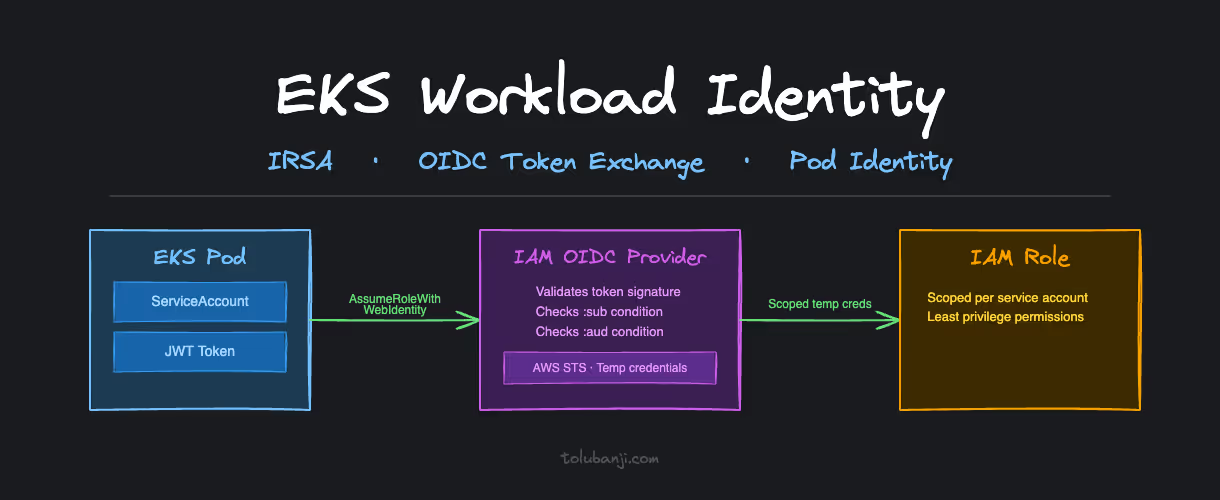
Most EKS clusters start with the same credential model: one IAM key, environment variables, permissions broad enough to avoid revisiting them. It works. The issue surfaces when you try to audit which service accessed what, when you need to rotate credentials without restarting every workload, or when a single compromised container exposes the full IAM role to an attacker.
These are not edge cases. They are the predictable outcomes of treating workload identity as an afterthought.
OIDC and IRSA move AWS access from a shared credential problem to an identity problem. Each service account gets a scoped IAM role, credentials are temporary, and CloudTrail can tell you exactly which workload made every API call.
The Default Credential Model and Why It Breaks
Here’s what I was about to do, and what most teams do when they first need AWS access from Kubernetes:
# DON'T DO THIS
apiVersion: apps/v1
kind: Deployment
metadata:
  name: dangerous-app
spec:
  template:
    spec:
      containers:
      - name: app
        image: my-app:latest
        env:
        - name: AWS_ACCESS_KEY_ID
          value: "AKIAEXAMPLEKEY123"  # Same key for every pod
        - name: AWS_SECRET_ACCESS_KEY
          value: "secretkey123"       # Exposed in pod specs
The problems compound fast:
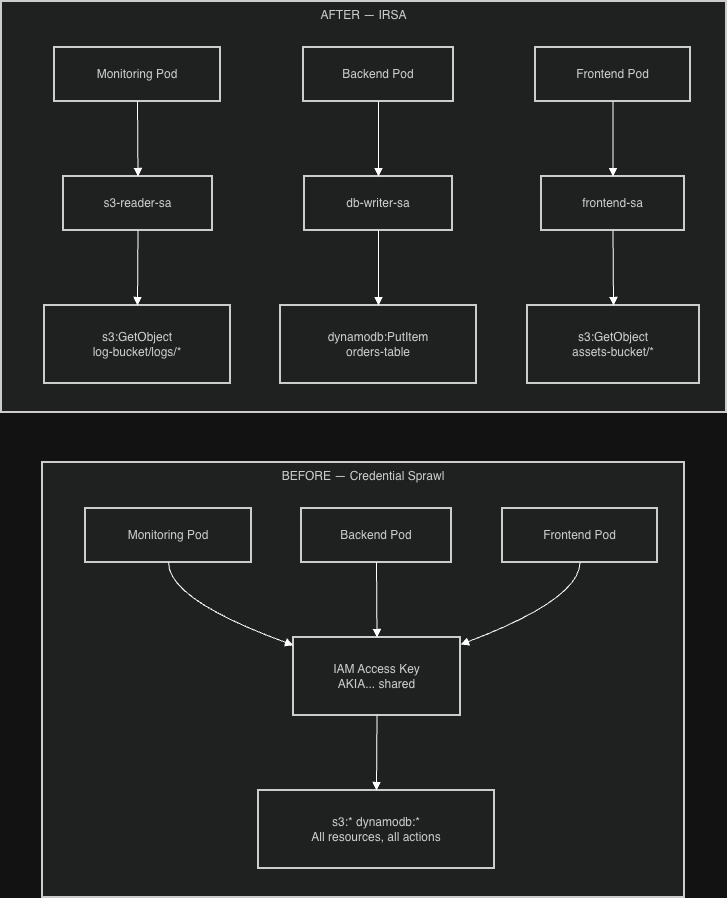
- Credential sprawl: same credentials everywhere, impossible to rotate without touching every deployment
- Over-privileged access: every service gets maximum permissions to avoid the complexity of scoping
- No audit trail: CloudTrail can’t tell you which service made which API call
- Exposure surface: credentials visible in pod specs, CI logs, environment dumps
- Blast radius: one compromised pod compromises everything
What OIDC and IRSA Actually Solve
OpenID Connect (OIDC) creates a trust relationship between your EKS cluster and AWS IAM. Your cluster gets a cryptographic identity, an OIDC issuer URL, that AWS IAM can verify. Instead of embedding credentials, pods prove their identity using tokens signed by that issuer.
IAM Roles for Service Accounts (IRSA) extends this trust to individual Kubernetes service accounts. Each workload gets its own scoped IAM role with exactly the permissions it needs. The monitoring pod gets read-only S3 access to its specific bucket. The backup job gets write access to the backup bucket. Nothing else.
The combination:
- EKS cluster identity → AWS OIDC provider → IAM trust relationship
- Kubernetes service account → pod identity → scoped IAM role
- Pod makes AWS API call → temporary credentials via STS → just-in-time access
No embedded secrets. No shared credentials.
How IRSA Works at Runtime
Understanding the token exchange flow matters when things break. And they will.
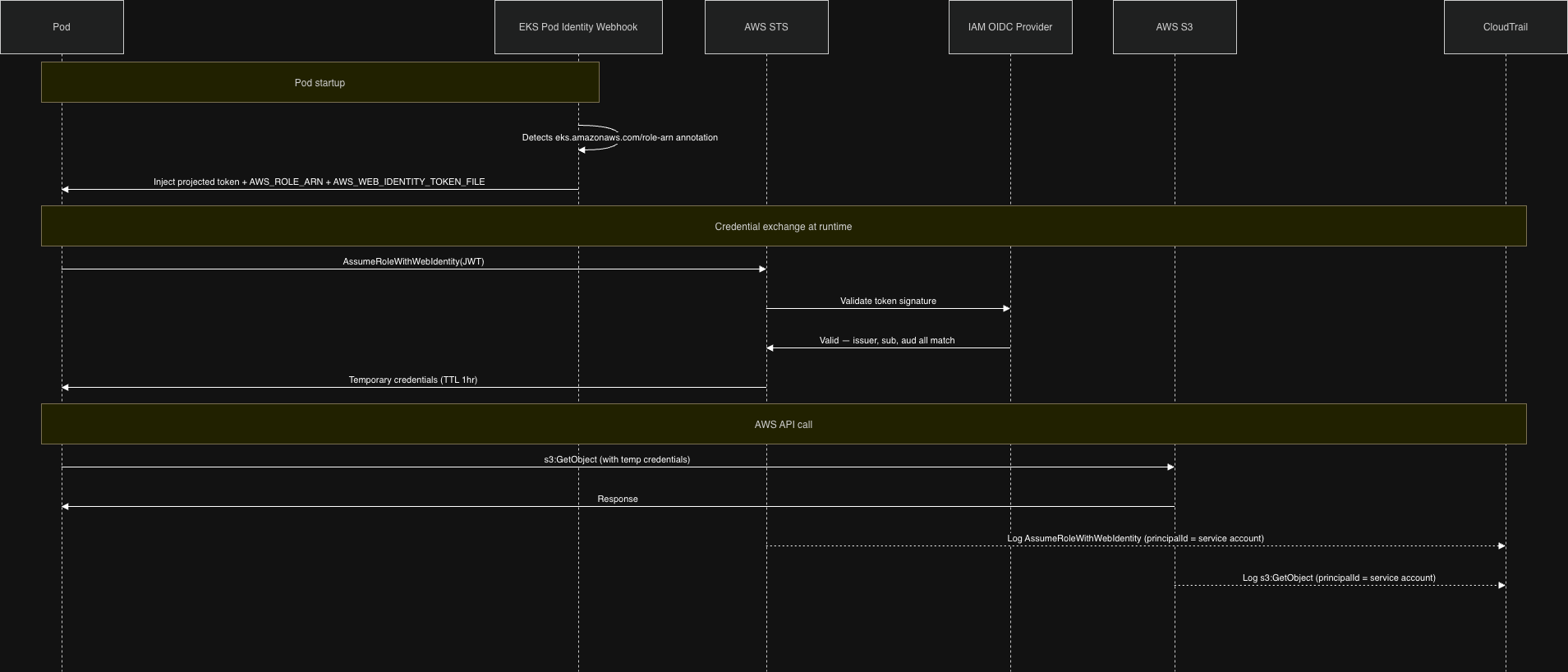
When a pod that uses an IRSA-annotated service account starts up, the EKS Pod Identity Webhook (a mutating admission controller running in the cluster) intercepts the pod creation and injects two things:
- A projected service account token mounted at
/var/run/secrets/eks.amazonaws.com/serviceaccount/token - Two environment variables:
AWS_ROLE_ARNandAWS_WEB_IDENTITY_TOKEN_FILE
The AWS SDK reads these automatically. When your application makes an AWS API call, the SDK:
- Reads the JWT token from the mounted path
- Calls
sts:AssumeRoleWithWebIdentity, presenting that token - AWS STS validates the token against the registered OIDC provider
- STS returns temporary credentials (valid for 1 hour)
- The SDK uses those credentials for the actual API call
CloudTrail logs the call with the service account identity in userIdentity.principalId, so you can see exactly which workload made which call.
The Trust Chain
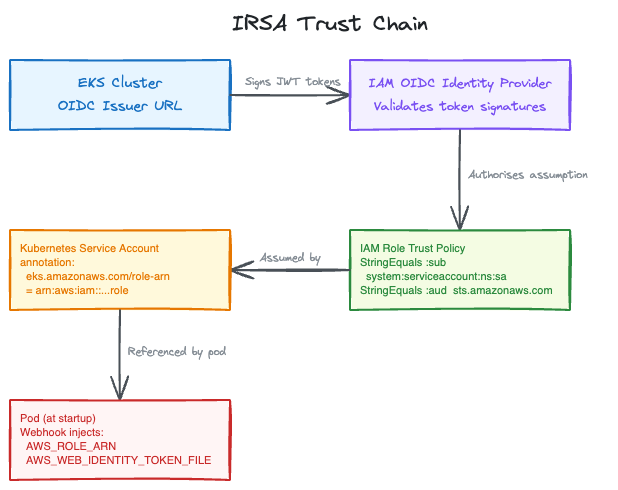
The security guarantee comes from three conditions AWS checks on every AssumeRoleWithWebIdentity call:
- Issuer: is this token from the OIDC provider registered in this account?
- Subject (
:sub): does the token’s service account match the condition in the trust policy? - Audience (
:aud): was this token intended forsts.amazonaws.com?
All three must match. If any condition fails, the assumption is denied.
Setting Up IRSA
Step 1: Register the OIDC Provider
EKS creates an OIDC issuer URL for your cluster automatically. You need to register it with IAM:
# Verify your cluster has an OIDC issuer
aws eks describe-cluster --name my-cluster --query "cluster.identity.oidc.issuer"
# Returns: https://oidc.eks.us-east-1.amazonaws.com/id/EXAMPLE123

# Register it with IAM (eksctl handles the thumbprint)
eksctl utils associate-iam-oidc-provider --cluster my-cluster --approve
This is a one-time step per cluster. If you’re running multiple clusters, each gets its own OIDC provider.
Step 2: Create a Scoped IAM Role
The trust policy is where you specify exactly which service account can assume this role. The :sub condition is the binding. It must match system:serviceaccount:NAMESPACE:SERVICE_ACCOUNT_NAME exactly. Case, spelling, and namespace all matter.
{
  "Version": "2012-10-17",
  "Statement": [
    {
      "Effect": "Allow",
      "Principal": {
        "Federated": "arn:aws:iam::123456789012:oidc-provider/oidc.eks.us-east-1.amazonaws.com/id/EXAMPLE123"
      },
      "Action": "sts:AssumeRoleWithWebIdentity",
      "Condition": {
        "StringEquals": {
          "oidc.eks.us-east-1.amazonaws.com/id/EXAMPLE123:sub": "system:serviceaccount:logging:s3-reader-sa",
          "oidc.eks.us-east-1.amazonaws.com/id/EXAMPLE123:aud": "sts.amazonaws.com"
        }
      }
    }
  ]
}
The :aud condition prevents token reuse. A token issued for sts.amazonaws.com cannot be replayed against a different service.
Attach a permission policy that gives this role only what it needs:
{
  "Effect": "Allow",
  "Action": ["s3:GetObject"],
  "Resource": ["arn:aws:s3:::my-log-bucket/logs/*"]
}
Step 3: Annotate the Service Account
The eks.amazonaws.com/role-arn annotation is what tells the Pod Identity Webhook which role to wire up. When the webhook sees this annotation, it injects the token and environment variables:
apiVersion: v1
kind: ServiceAccount
metadata:
  name: s3-reader-sa
  namespace: logging
  annotations:
    eks.amazonaws.com/role-arn: arn:aws:iam::123456789012:role/EKS-S3-Reader-Role
    eks.amazonaws.com/sts-regional-endpoints: "true"
The sts-regional-endpoints: "true" annotation routes STS calls to the regional endpoint instead of the global one. In high-pod-density clusters this matters: the global STS endpoint has lower rate limits and higher latency than the regional endpoint.
Step 4: Deploy Without Credentials
apiVersion: apps/v1
kind: Deployment
metadata:
  name: s3-reader-app
  namespace: logging
spec:
  template:
    spec:
      serviceAccountName: s3-reader-sa
      containers:
      - name: s3-reader
        image: my-app:latest
        env:
        - name: AWS_DEFAULT_REGION
          value: "us-east-1"
        # No credentials. The AWS SDK finds them via AWS_WEB_IDENTITY_TOKEN_FILE.
Your application code doesn’t change. The SDK credential chain handles everything.
Common Problems
Trust Policy Mismatch: The Most Common Failure
You get AccessDenied on AssumeRoleWithWebIdentity. The trust policy condition doesn’t match the actual service account.
Debug it by decoding the token your pod is presenting:
kubectl exec -it -n logging pod/your-pod -- \
  cat /var/run/secrets/eks.amazonaws.com/serviceaccount/token
Paste that JWT into jwt.io and check the sub claim. It must match your trust policy condition character for character:
system:serviceaccount:logging:s3-reader-saWrong namespace, wrong name, wrong case: all produce the same AccessDenied with no indication of which condition failed.
Token Not Injected
The AWS SDK falls back to the EC2 instance profile. Your pod picks up node-level credentials instead of the scoped service account role.
This means the Pod Identity Webhook didn’t inject the token. Check two things:
- The service account has the
eks.amazonaws.com/role-arnannotation - The pod’s
spec.serviceAccountNamereferences that service account
The webhook only injects on pod creation. If you patch the service account annotation after a pod is running, the pod won’t pick it up. Restart the pod.
Note on automountServiceAccountToken: this flag controls whether Kubernetes mounts the standard service account token (at /var/run/secrets/kubernetes.io/serviceaccount/token). The IRSA token at the EKS path is injected by the webhook independently of this flag. IRSA works fine even when automountServiceAccountToken: false.
Overly Broad Policies
I’ve taken the approach of starting with no permissions and letting CloudTrail AccessDenied events tell me what to add. It’s slower than guessing broad and restricting later, but you end up with a much tighter policy. aws iam simulate-principal-policy helps verify your policy before deployment.
Multi-Environment Pattern
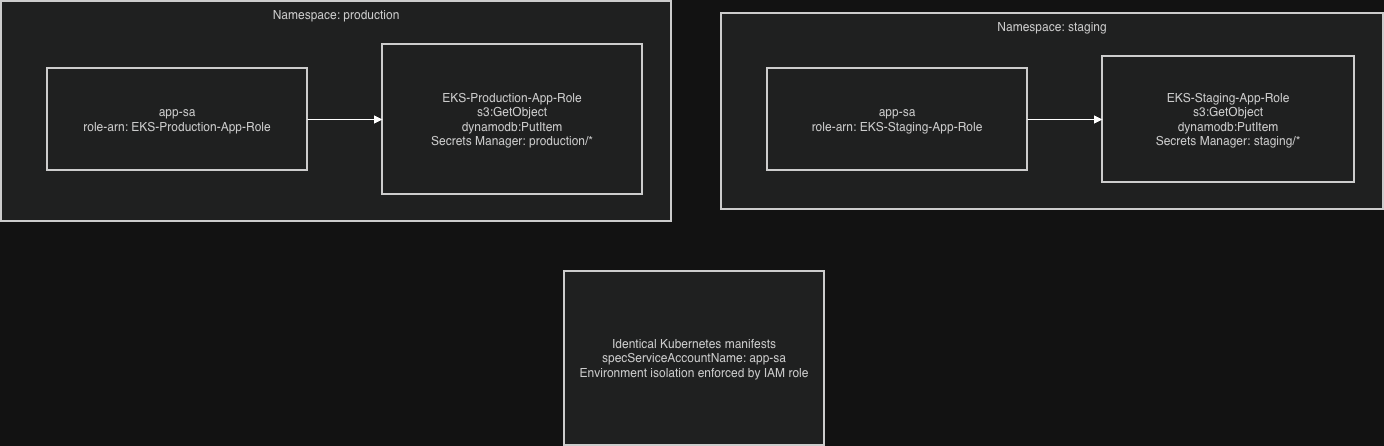
Use the same service account name across namespaces, different IAM roles per environment. Identical Kubernetes manifests, environment-specific access control:
# production namespace
apiVersion: v1
kind: ServiceAccount
metadata:
  name: app-sa
  namespace: production
  annotations:
    eks.amazonaws.com/role-arn: arn:aws:iam::123456789012:role/EKS-Production-App-Role
---
# staging namespace
apiVersion: v1
kind: ServiceAccount
metadata:
  name: app-sa
  namespace: staging
  annotations:
    eks.amazonaws.com/role-arn: arn:aws:iam::123456789012:role/EKS-Staging-App-Role
Never share IAM roles between environments. The blast radius of a compromised staging pod should stop at staging.
Auditing IRSA Usage
CloudWatch Insights query to see which service accounts are assuming which roles:
fields @timestamp, userIdentity.principalId, eventName, errorCode
| filter eventName = "AssumeRoleWithWebIdentity"
| stats count() by userIdentity.principalId, eventName
| sort count desc
Set up alerts for failed AssumeRoleWithWebIdentity attempts. Repeated failures usually mean a trust policy misconfiguration that’s silently breaking a workload, or a pod that was moved to a new namespace without updating the role condition.
Check unused permissions with IAM Access Analyzer. If a role hasn’t used an action in 90 days, remove it.
Troubleshooting Checklist
When IRSA breaks:
# 1. Verify the OIDC provider is registered
aws iam list-open-id-connect-providers

# 2. Verify the service account annotation
kubectl describe serviceaccount -n your-namespace your-service-account

# 3. Get inside the pod and check what identity it has
kubectl exec -it -n your-namespace pod/your-pod -- bash
echo $AWS_ROLE_ARN
echo $AWS_WEB_IDENTITY_TOKEN_FILE
aws sts get-caller-identity
If get-caller-identity returns the EC2 node role rather than the service account role, the webhook didn’t inject the token. If it returns the right role but AWS calls still fail, the permission policy is too restrictive. Use CloudTrail to find the denied action.
CloudTrail error codes on AssumeRoleWithWebIdentity:
AccessDenied: trust policy conditions don’t matchInvalidIdentityToken: OIDC provider misconfiguration or token expired before the call
IRSA or Pod Identity?
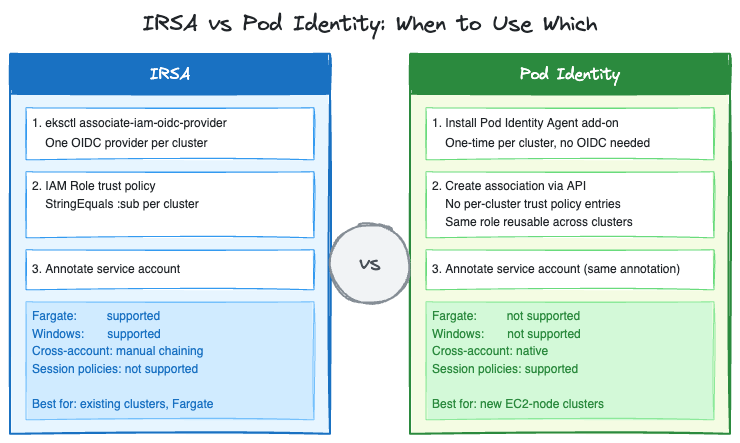
Pod Identity is AWS’s newer mechanism for the same problem. It went GA in November 2023 and has had two significant updates since: cross-account access via IAM role chaining (June 2025) and session policies for fine-grained per-pod scoping (March 2026).
The practical differences:
| IRSA | Pod Identity | |
|---|---|---|
| OIDC provider setup | Required per cluster | Not required |
| Trust policy per cluster | Yes, each cluster needs its own entry | No, one role works across clusters |
| Trust policy size limit | Character-based (2,048 default, 8,192 max). Hits limit at scale because each cluster needs its own OIDC ARN entry | No per-cluster trust entries |
| Cross-account access | Two options: (1) target account registers your cluster’s OIDC issuer as its own provider, or (2) chained AssumeRole | Native, via association APIs |
| Session policies | Not supported | Supported (March 2026) |
| Fargate support | Yes | No |
| Windows nodes | Yes | No |
For new clusters on EC2 nodes: Pod Identity removes the OIDC provider setup step and solves the trust policy size problem that bites teams running many services per cluster. For existing clusters already on IRSA, the migration is mechanical but the operational cost is real. Evaluate whether the simplification is worth it for your situation.
For Fargate workloads: IRSA is still the only option.
Understanding AssumeRoleWithWebIdentity is still worth the time even if you move to Pod Identity. The two mechanisms differ more than they look: with IRSA, each pod calls STS directly via the SDK. With Pod Identity, the node-level EKS Pod Identity Agent makes a single AssumeRoleForPodIdentity call to the EKS Auth service on behalf of pods on that node. The credentials are then served locally. This is an architectural difference that improves scalability at high pod density, not just a trust policy simplification.
Closing Notes
The key shift in thinking about workload identity: consider what happens when any given pod is compromised, not just whether it can do its normal job. A monitoring pod that can read its specific log bucket is contained. A monitoring pod with s3:* on * is a data exfiltration path.
IRSA adds setup overhead compared to environment variable credentials. That overhead is in the right place: authentication and authorization, where it’s auditable and reviewable. The alternative pushes complexity into incident response.
Set up the CloudTrail filtering and CloudWatch alerts before an incident forces you to. Querying raw CloudTrail under pressure is slower than having the filters ready.