Why I Stopped Creating IAM Users
Part 1 covered IAM fundamentals. This part is about STS and temporary credentials, which is how you should be handling AWS access in most real-world scenarios.
Why Temporary Credentials Matter
Access keys created for IAM users don’t expire by default. You create them, they work forever until someone rotates or deletes them. Rotation is manual and most organizations don’t do it consistently.
When a long-lived key leaks, you have persistent access until someone discovers it. Could be days, months, or over a year.
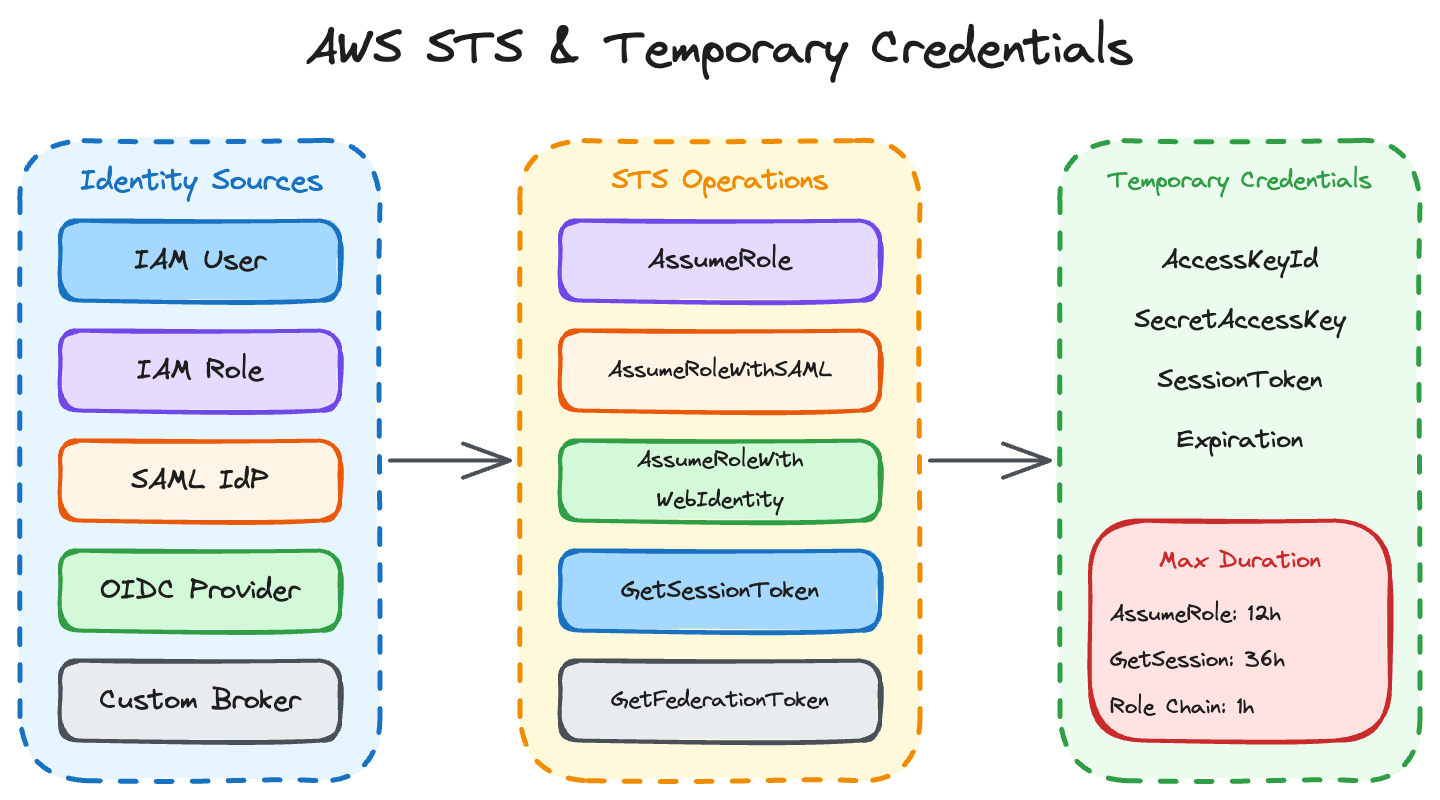
STS (Security Token Service) solves this by issuing credentials that expire automatically. No secrets to store for roles. Built-in audit trail of who assumed what and when. Session duration controls let you limit how long credentials are valid.
# Check when access keys were last used - find the zombies
aws iam list-access-keys --user-name alice
aws iam get-access-key-last-used --access-key-id AKIAIOSFODNN7EXAMPLE
If you find keys that haven’t been used in 90 days, they probably shouldn’t exist.
STS API Operations
Five STS operations exist, and the exam tests all of them. I’ve used four of them in production; the fifth (GetFederationToken) keeps showing up in exam questions but I’ve never actually needed it.
AssumeRole
This is the one you’ll use constantly. You call it with a role ARN, and if the trust policy allows your principal, you get back temporary credentials.
# Assuming a role and getting temporary credentials
aws sts assume-role \
  --role-arn arn:aws:iam::123456789012:role/TargetRole \
  --role-session-name my-session
Returns AccessKeyId, SecretAccessKey, SessionToken, and Expiration. Default session is 1 hour. Maximum is 12 hours, but the role must be configured to allow longer sessions.
AssumeRoleWithSAML
Used for SAML 2.0 federation with identity providers like Active Directory, Okta, or Azure AD. The user authenticates with the IdP, gets a SAML assertion, and exchanges it for AWS credentials.
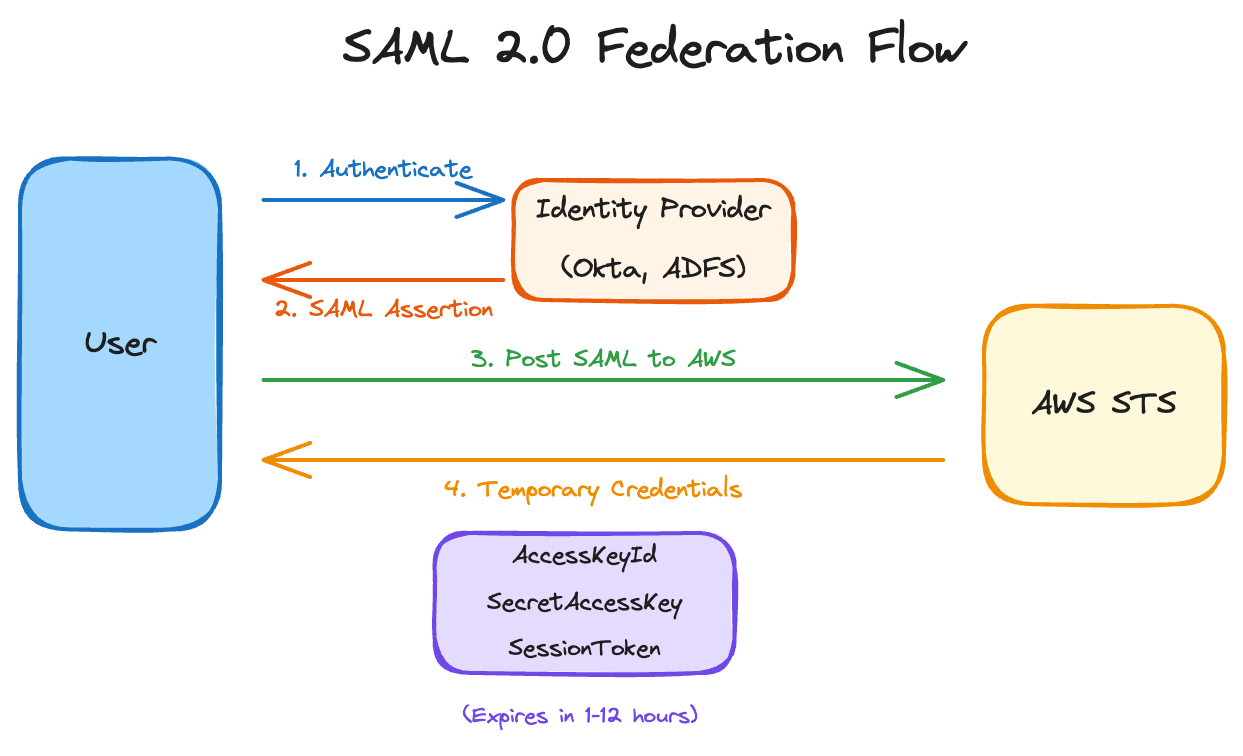
Duration can be up to 12 hours. The exam asks about this flow regularly, so know the sequence.
AssumeRoleWithWebIdentity
For OIDC providers like Cognito, Google, or GitHub Actions. This is the modern approach for web apps, mobile apps, and CI/CD pipelines.
IRSA (IAM Roles for Service Accounts) in EKS uses this under the hood. GitHub Actions uses it for keyless AWS access. If you’re still putting AWS credentials in GitHub Secrets, this is what you should be using instead.
{
  "Version": "2012-10-17",
  "Statement": [{
    "Effect": "Allow",
    "Principal": {
      "Federated": "arn:aws:iam::123456789012:oidc-provider/token.actions.githubusercontent.com"
    },
    "Action": "sts:AssumeRoleWithWebIdentity",
    "Condition": {
      "StringEquals": {
        "token.actions.githubusercontent.com:aud": "sts.amazonaws.com",
        "token.actions.githubusercontent.com:sub": "repo:myorg/myrepo:ref:refs/heads/main"
      }
    }
  }]
}
That condition is critical. Without it, any GitHub Actions workflow could assume your role. Scope it to specific repos and branches.
GetSessionToken
Used for MFA-protected API access with IAM user credentials. You provide your access key, secret key, and MFA code. You get back temporary credentials that carry the MFA context.
# Getting MFA-protected session credentials
aws sts get-session-token \
  --serial-number arn:aws:iam::123456789012:mfa/alice \
  --token-code 123456
Maximum duration is 36 hours. Use this when you need to prove MFA was used for subsequent API calls.
GetFederationToken
For custom identity brokers. Less common than the others but still appears on the exam. Requires IAM user or root credentials to call. You pass a policy that scopes down what the federated user can do.
Maximum duration is 36 hours. I’ve honestly never used this one outside of exam prep.
Quick Comparison
| Operation | Use Case | Can Pass Policy? | Max Duration |
|---|---|---|---|
| AssumeRole | Role assumption | Yes | 12h |
| AssumeRoleWithSAML | Enterprise SSO | Yes | 12h |
| AssumeRoleWithWebIdentity | Web/Mobile/CI-CD | Yes | 12h |
| GetSessionToken | MFA-protected access | No | 36h |
| GetFederationToken | Custom broker | Yes (required) | 36h |
Role Trust Policies
A role has two policy types: the permission policy (what the role can do) and the trust policy (who can assume the role). The trust policy is where I see the most mistakes.
Trust Policy Structure
{
  "Version": "2012-10-17",
  "Statement": [{
    "Effect": "Allow",
    "Principal": {
      "AWS": "arn:aws:iam::111111111111:root"
    },
    "Action": "sts:AssumeRole",
    "Condition": {
      "StringEquals": {
        "sts:ExternalId": "unique-id-from-partner"
      }
    }
  }]
}
Principal Types
The Principal element determines who can assume the role.
AWS Account: "AWS": "arn:aws:iam::123456789012:root" allows any principal in that account to assume the role (if they also have sts:AssumeRole permission on their side).
Specific Role or User: "AWS": "arn:aws:iam::123456789012:role/SpecificRole" limits assumption to just that role.
AWS Service: "Service": "lambda.amazonaws.com" lets Lambda assume the role. This is how Lambda execution roles work.
SAML Provider: "Federated": "arn:aws:iam::123456789012:saml-provider/ADFS" for SAML federation.
OIDC Provider: "Federated": "arn:aws:iam::123456789012:oidc-provider/token.actions.githubusercontent.com" for OIDC federation.
The Confused Deputy Problem
This comes up on the exam regularly. Here’s the scenario: you grant a third-party service access to your AWS account via a role. That third party has many customers. Without protection, another customer of theirs could trick the service into accessing your resources.
The solution is External ID. You generate a unique ID and require it in the trust policy condition. The third party includes your External ID when assuming the role. Other customers don’t know your External ID, so they can’t trick the service into assuming your role.
{
  "Condition": {
    "StringEquals": {
      "sts:ExternalId": "your-unique-external-id"
    }
  }
}
External ID is not a secret. It’s a unique identifier that proves the assumption request is intended for your account. This distinction trips people up.
Cross-Account Access
Three patterns exist for cross-account access. Knowing when to use each matters for both the exam and real implementations.
Pattern 1: Direct Role Assumption
Account A creates a role with a trust policy allowing Account B. Account B’s users or roles have sts:AssumeRole permission for that role ARN.
# In Account A: create the role with trust policy
aws iam create-role \
  --role-name CrossAccountRole \
  --assume-role-policy-document '{
    "Version": "2012-10-17",
    "Statement": [{
      "Effect": "Allow",
      "Principal": {"AWS": "arn:aws:iam::ACCOUNT_B_ID:root"},
      "Action": "sts:AssumeRole"
    }]
  }'

# Attach permissions to the role
aws iam attach-role-policy \
  --role-name CrossAccountRole \
  --policy-arn arn:aws:iam::aws:policy/AmazonS3ReadOnlyAccess
// In Account B: grant permission to assume the role
// This policy goes on the user or role that needs cross-account access
{
"Version": "2012-10-17",
"Statement": [{
"Effect": "Allow",
"Action": "sts:AssumeRole",
"Resource": "arn:aws:iam::ACCOUNT_A_ID:role/CrossAccountRole"
}]
}Remember from Part 1: cross-account access requires both sides to allow it. The trust policy in Account A allows the assumption. The identity policy in Account B allows calling sts:AssumeRole. Miss either one and you get AccessDenied.
Pattern 2: Role Chaining
A principal assumes Role A, then uses those credentials to assume Role B, then Role C.
User → Role A → Role B → Role CImportant limitation that catches people: when chaining roles, the maximum session duration is 1 hour regardless of what the individual roles allow. Each hop requires both trust (on the target) and permission (on the source).
Pattern 3: Resource-Based Policies
Some services allow direct cross-account access through resource policies without role assumption. S3, KMS, SQS, SNS, and Lambda support this.
{
  "Version": "2012-10-17",
  "Statement": [{
    "Effect": "Allow",
    "Principal": {"AWS": "arn:aws:iam::ACCOUNT_B_ID:role/DataProcessor"},
    "Action": "s3:GetObject",
    "Resource": "arn:aws:s3:::my-bucket/*"
  }]
}
When to use resource-based vs role assumption: resource-based is simpler for single-resource access. Role assumption is better when you need access to multiple resources or services, or when you want a cleaner audit trail of cross-account activity.
MFA-Protected API Access
Sometimes you want certain actions to require MFA, even for programmatic access. Two condition keys make this work.
The Conditions
aws:MultiFactorAuthPresent - Boolean, true if MFA was used in the current session.
aws:MultiFactorAuthAge - Number of seconds since MFA authentication. Use this for time-sensitive operations.
The GetSessionToken Flow
# Get MFA-protected credentials
aws sts get-session-token \
  --serial-number arn:aws:iam::123456789012:mfa/alice \
  --token-code 123456
This returns temporary credentials that carry the MFA context. Use those credentials for subsequent calls.
Policy Example: Require MFA for Sensitive Actions
{
  "Effect": "Deny",
  "Action": ["iam:*", "organizations:*"],
  "Resource": "*",
  "Condition": {
    "BoolIfExists": {
      "aws:MultiFactorAuthPresent": "false"
    }
  }
}
This denies IAM and Organizations actions unless MFA was used. The BoolIfExists handles cases where the condition key might not be present.
Federation
Federation lets users authenticate with an external identity provider and get AWS credentials. Two main protocols: SAML 2.0 and OIDC.
SAML 2.0 Federation
Used with enterprise identity providers: Active Directory Federation Services, Okta, Azure AD, PingFederate.
The flow is shown in the diagram above: user authenticates with IdP, IdP returns SAML assertion, user posts assertion to AWS, AWS validates and returns temporary credentials (or console access).
Setting up SAML federation:
# Create the SAML provider in AWS
aws iam create-saml-provider \
  --saml-metadata-document file://idp-metadata.xml \
  --name CompanyADFS

# Create role that trusts the SAML provider
aws iam create-role \
  --role-name SAMLFederatedRole \
  --assume-role-policy-document '{
    "Version": "2012-10-17",
    "Statement": [{
      "Effect": "Allow",
      "Principal": {"Federated": "arn:aws:iam::123456789012:saml-provider/CompanyADFS"},
      "Action": "sts:AssumeRoleWithSAML",
      "Condition": {
        "StringEquals": {
          "SAML:aud": "https://signin.aws.amazon.com/saml"
        }
      }
    }]
  }'
The IdP sends attributes in the SAML assertion that map to AWS roles. A user can be allowed to assume multiple roles based on their group memberships in the IdP.
OIDC Federation
Modern alternative to SAML. Used by GitHub Actions, GitLab CI, Google, and Kubernetes (IRSA).
# Create OIDC provider for GitHub Actions
aws iam create-open-id-connect-provider \
  --url https://token.actions.githubusercontent.com \
  --client-id-list sts.amazonaws.com \
  --thumbprint-list 6938fd4d98bab03faadb97b34396831e3780aea1
The trust policy should include conditions to restrict which tokens are accepted:
{
  "Version": "2012-10-17",
  "Statement": [{
    "Effect": "Allow",
    "Principal": {
      "Federated": "arn:aws:iam::123456789012:oidc-provider/token.actions.githubusercontent.com"
    },
    "Action": "sts:AssumeRoleWithWebIdentity",
    "Condition": {
      "StringEquals": {
        "token.actions.githubusercontent.com:aud": "sts.amazonaws.com"
      },
      "StringLike": {
        "token.actions.githubusercontent.com:sub": "repo:myorg/myrepo:*"
      }
    }
  }]
}
Without the sub condition, any GitHub repository could assume your role. Scope it to specific repos, branches, or environments.
IAM Identity Center
Previously called AWS SSO. Provides centralized access management across multiple AWS accounts.
Key concepts:
Permission Sets are collections of IAM policies. You assign permission sets to users or groups for specific accounts. Identity Center creates roles in each account based on the permission sets.
Identity Source can be the built-in directory, Active Directory, or an external IdP.
Identity Center vs direct federation: Identity Center is easier to manage across many accounts. Direct federation gives more control but requires more setup per account.
Cognito
Two components that often confuse people:
User Pools handle authentication. Users sign up, sign in, get tokens. Think of it as a user directory with OAuth/OIDC capabilities.
Identity Pools handle authorization. They exchange tokens (from User Pools, Google, Facebook, SAML) for temporary AWS credentials.
A mobile app might use both: User Pool for login, Identity Pool to get AWS credentials for accessing S3 or DynamoDB directly from the app.
Session Duration and Limits
This table has saved me debugging time more than once:
| Method | Min | Default | Max | Notes |
|---|---|---|---|---|
| AssumeRole | 15 min | 1 hour | 12h | Role’s MaxSessionDuration setting |
| AssumeRoleWithSAML | 15 min | 1 hour | 12h | Same as above |
| AssumeRoleWithWebIdentity | 15 min | 1 hour | 12h | Same as above |
| GetSessionToken | 15 min | 12 hours | 36h | For MFA-protected access |
| GetFederationToken | 15 min | 12 hours | 36h | Custom federation |
| Role chaining | N/A | 1 hour | 1h | Hard limit, can’t change |
That role chaining limit of 1 hour is a hard ceiling. No configuration changes it.
# Setting MaxSessionDuration on a role
aws iam update-role --role-name MyRole --max-session-duration 43200
Exam Notes
Know the five STS operations and when to use each. AssumeRole is the most common, but GetSessionToken for MFA and GetFederationToken for custom brokers appear in questions.
The confused deputy problem comes up regularly. Know that External ID solves it and that External ID is not a secret.
Role chaining has a 1-hour maximum session. This trips people up constantly.
SAML vs OIDC: SAML for enterprise IdPs, OIDC for modern web/mobile/CI-CD. The exam tests which protocol fits which scenario.
IAM Identity Center (SSO) questions often compare it to direct federation. Know when each is appropriate.
Part 2 of 4 in the AWS IAM Security Deep Dive series.