IAM Basics I Keep Coming Back To
I’m renewing my AWS Security Specialty certification. Wrote SCS-02 a while back, and now SCS-03 covers new services and tooling that didn’t exist then. Rather than just grinding practice exams, I figured I’d document the material as articles. Forces me to actually understand it, and maybe someone else finds it useful.
This first part covers IAM fundamentals: identity types, the six policy types, and how AWS evaluates permissions when multiple policies are involved.
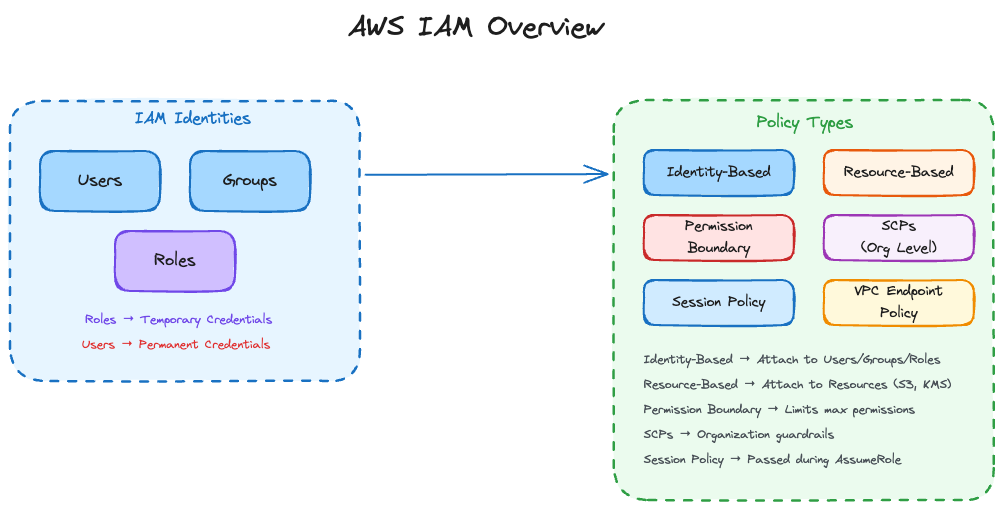
IAM Identity Types
AWS gives you three identity types. Choosing the wrong one is where security problems could start
Users
IAM users are for humans. If you’re creating an IAM user for a Lambda function or an EC2 instance, stop.
The problem with users is credentials. You create a user, you get an access key. That key doesn’t expire. It sits in ~/.aws/credentials, gets committed to git, ends up in a Docker image, gets copied to a colleague’s laptop during debugging; well you could guess the rest…
# Finding users who've never logged into the console
aws iam list-users --query 'Users[?PasswordLastUsed==`null`].UserName'
We should use IAM users when console or CLI access from workstation is required. Don’t use them when an application, CI/CD pipeline, or AWS service needs access. Use roles for those.
Groups
Groups hold policies that get inherited by member users. They can’t do anything themselves.
You can’t nest groups in AWS. The workaround is multiple group memberships:
# Alice needs permissions from both groups - Developers for daily work,
# OnCallResponders for incident access. Policies attached to each group
# combine to form her effective permissions.
aws iam add-user-to-group --user-name alice --group-name Developers
aws iam add-user-to-group --user-name alice --group-name OnCallResponders
Common patterns: Developers (read most things, write to dev resources), Admins (broader access, still not root), ReadOnly (auditors, new team members), Billing (finance team only).
Roles
Roles should be your default choice. No permanent credentials. When something assumes a role, it gets temporary credentials that expire. If those credentials leak, the damage is time-limited.
A role has two parts: a trust policy (who can assume the role) and a permission policy (what the role can do).
# List all roles
aws iam list-roles --query 'Roles[].RoleName'

# See who can assume a specific role
aws iam get-role --role-name MyRole --query 'Role.AssumeRolePolicyDocument'| Scenario | Use | Reason |
|---|---|---|
| Developer console access | User + MFA + Role assumption | Audit trail, temporary elevation |
| Lambda function | Execution Role | No credentials in code |
| Cross-account access | Role | Trust policy controls access |
| CI/CD pipeline | Role via OIDC | No stored secrets |
| EC2 workload | Instance Profile + Role | Metadata service provides creds |
Policy Types
Six policy types exist in IAM. They interact in ways that aren’t obvious until you understand the evaluation logic.
Identity-Based Policies
These attach to users, groups, or roles. Three flavors exist.
AWS Managed Policies are pre-built by AWS. Convenient but often too broad. ReadOnlyAccess sounds safe until you realize it includes secretsmanager:GetSecretValue. Always review the full policy document before assigning. The name doesn’t tell the whole story.
Customer Managed Policies are ones you create. Version-controlled, reusable across identities. This is what you want for most things.
Inline Policies are embedded directly in a user, group, or role. Hard to audit and don’t show up in policy listings. Use sparingly.
# Find inline policies on users
aws iam list-users --query 'Users[].UserName' --output text | \
  xargs -I {} aws iam list-user-policies --user-name {}
Resource-Based Policies
These attach to resources instead of identities. S3 bucket policies, KMS key policies, Lambda resource policies. They have a Principal element that says who the policy applies to.
{
  "Version": "2012-10-17",
  "Statement": [{
    "Effect": "Allow",
    "Principal": {"AWS": "arn:aws:iam::111111111111:role/DataProcessor"},
    "Action": "s3:GetObject",
    "Resource": "arn:aws:s3:::my-bucket/*"
  }]
}
Permission Boundaries
Permission boundaries set the maximum permissions an identity can have, regardless of what policies are attached. An identity only gets permissions that exist in both the identity policy AND the permission boundary. If the identity policy allows s3:* but the boundary only allows s3:GetObject, the effective permission is s3:GetObject.
Use case: developers can create IAM roles for their applications, but you don’t want them creating admin roles.
{
  "Version": "2012-10-17",
  "Statement": [
    {
      "Effect": "Allow",
      "Action": ["s3:*", "dynamodb:*", "lambda:*", "logs:*"],
      "Resource": "*"
    },
    {
      "Effect": "Deny",
      "Action": ["iam:*", "organizations:*"],
      "Resource": "*"
    }
  ]
}
Even if a developer attaches AdministratorAccess to their role, the boundary blocks IAM actions.
Service Control Policies
Organization-level guardrails. They don’t grant permissions, they only restrict what’s possible in member accounts. SCPs don’t affect the management account.
Common patterns: block certain regions, prevent disabling CloudTrail, require encryption.
Session Policies
Passed during AssumeRole to further restrict the session. Useful for dynamic permission scoping.
aws sts assume-role \
  --role-arn arn:aws:iam::123456789012:role/DataRole \
  --role-session-name restricted-session \
  --policy '{"Version":"2012-10-17","Statement":[{"Effect":"Allow","Action":"s3:GetObject","Resource":"arn:aws:s3:::specific-bucket/*"}]}'
VPC Endpoint Policies
Controls what can go through a VPC endpoint. Often forgotten when setting up private access to S3 or DynamoDB.
Policy Evaluation Logic
When a request comes in, AWS doesn’t just check if there’s an Allow somewhere. It evaluates policies in a specific order, and understanding this flow is critical for debugging access issues.
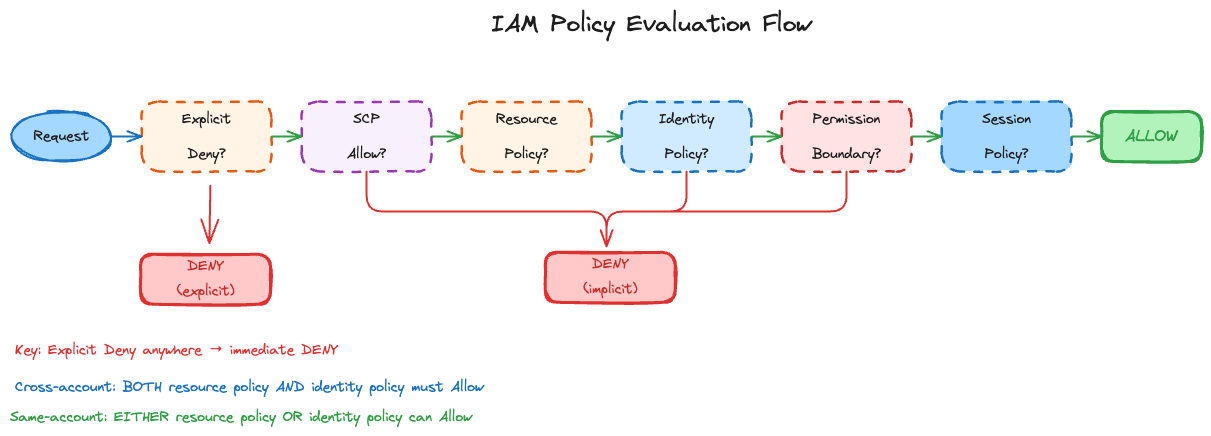
The AWS documentation has a detailed flowchart, but here’s the sequence:
Deny evaluation: AWS evaluates all applicable policies and checks for explicit denies first. An explicit deny anywhere stops evaluation immediately.
Organizations SCPs: If the account is part of an AWS Organization with applicable SCPs, there must be an Allow in the SCP. No Allow means implicit deny.
Resource-based policies: If the resource has a policy (S3 bucket policy, KMS key policy), AWS checks if it allows the action. For same-account requests, an Allow here can grant access even without an identity policy.
Identity-based policies: Does the principal have an identity policy that allows the action? No Allow means implicit deny.
IAM permissions boundaries: If the principal has a boundary attached, the action must be allowed by the boundary. The boundary can only restrict, never expand permissions.
Session policies: For role sessions or federated user sessions, if a session policy was passed during AssumeRole, the action must be allowed by it.
Same-Account vs Cross-Account
This distinction trips people up, even me but let’s break down.
Same account: Either the resource policy OR the identity policy can grant access.
Cross-account: Both the resource policy AND the identity policy must allow access.
Example: Account A has an S3 bucket. Account B has a role that needs to read from it. For this to work, the bucket policy must allow Account B’s role AND Account B’s role must have s3:GetObject permission. Miss either one and you get AccessDenied.
Implicit vs Explicit Deny
Implicit deny means no Allow statement exists. This is the default state. Explicit deny means a Deny statement specifically blocks the action.
Explicit deny always wins. You cannot override it with an Allow anywhere else.
{
  "Effect": "Deny",
  "Action": "s3:DeleteBucket",
  "Resource": "*"
}
No matter what other policies say, no one with this policy can delete buckets.
Worked Example
Let’s trace through a scenario where a developer tries to delete an object from S3.
The Setup:
Alice is a developer in the Engineering OU. Her account has several policies in play:
Organization SCP: Restricts all actions to us-east-1 and us-west-2 regions
Identity Policy: AmazonS3FullAccess (allows s3:*)
Permission Boundary: DeveloperBoundary (allows s3:GetObject, s3:PutObject, s3:ListBucket)
Alice runs: aws s3 rm s3://app-data-bucket/old-file.json
AWS walks through each policy type in order:
Explicit Deny Check: AWS scans all applicable policies for any statement that explicitly denies
s3:DeleteObject. None of the policies have a Deny statement for this action. Evaluation continues.SCP Check: The Organization SCP restricts actions to us-east-1 and us-west-2. The bucket is in us-east-1, so the region is allowed. The SCP doesn’t block S3 actions. Evaluation continues.
Resource-Based Policy Check: The S3 bucket doesn’t have a bucket policy attached. Nothing to evaluate here. Evaluation continues.
Identity-Based Policy Check: Alice has
AmazonS3FullAccessattached, which includes"Action": "s3:*". This allowss3:DeleteObject. Evaluation continues.Permission Boundary Check: Alice has
DeveloperBoundaryas her permission boundary. It only allowss3:GetObject,s3:PutObject, ands3:ListBucket. The actions3:DeleteObjectis not in this list. DENIED.
Alice gets AccessDenied even though her identity policy grants s3:*. The permission boundary limited what she could actually do. This is how boundaries are supposed to work. The admin who set up her account decided developers shouldn’t delete objects, regardless of what other policies they accumulate over time.
Root Account
Every AWS account has a root user with unrestricted access. Can’t be limited by IAM policies or SCPs.
Root is actually needed for: closing the account, changing the account name, certain billing operations, restoring IAM admin access if you’ve locked yourself out. Everything else should use IAM identities.
MFA is mandatory. Hardware MFA is better than virtual. A phone can be compromised, lost, or backed up to iCloud where someone else can access it.
# Check for root activity in CloudTrail
aws cloudtrail lookup-events \
  --lookup-attributes AttributeKey=Username,AttributeValue=root \
  --query 'Events[].{Time:EventTime,Event:EventName,IP:SourceIPAddress}'
If this returns anything besides initial account setup, investigate.
You can restrict root in member accounts with SCPs:
{
  "Version": "2012-10-17",
  "Statement": [{
    "Effect": "Deny",
    "Action": "*",
    "Resource": "*",
    "Condition": {
      "StringLike": {
        "aws:PrincipalArn": "arn:aws:iam::*:root"
      }
    }
  }]
}
Exam Notes
Policy evaluation order is tested heavily. Know the flowchart. Same-account vs cross-account comes up in scenario questions. Remember that cross-account needs both sides to allow. Permission boundaries appear in delegation scenarios. SCPs don’t affect the management account (common trick question). Root credentials questions: know what only root can do.