IAM Patterns That Scale
Part 2 covered STS and temporary credentials. This part gets into the patterns that make IAM work at scale: conditions for precision, ABAC for dynamic access, permission boundaries for safe delegation, and SCPs for organizational guardrails.
If Part 1 was “what IAM is” and Part 2 was “how credentials work,” this is “how to build something maintainable.”
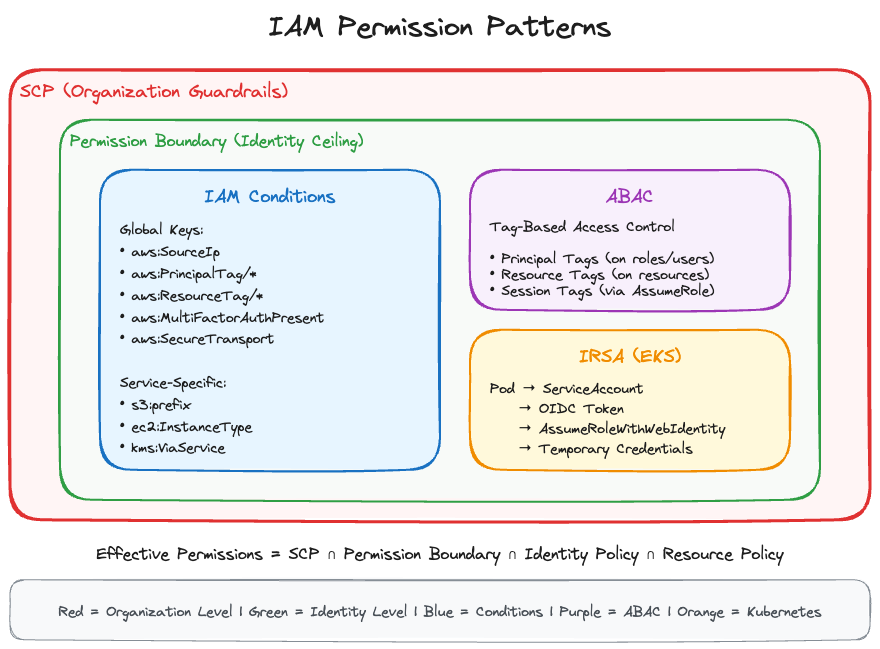
IAM Conditions
Conditions are how you add precision to IAM policies. Instead of “allow S3 access,” you can say “allow S3 access only from our corporate IP range, during business hours, with encryption required.”
Condition Structure
Every condition has three parts:
"Condition": {
  "ConditionOperator": {
    "ConditionKey": "value"
  }
}
The operator defines how to compare. The key defines what to compare. The value defines what to compare against.
Common Condition Operators
The ones you’ll use most are string and IP operators. StringEquals is exact, case-sensitive matching. StringLike lets you use wildcards. I use StringLike constantly for things like arn:aws:s3:::my-bucket/* patterns. StringNotEquals and StringNotLike are the inverse.
IpAddress and NotIpAddress check source IPs against CIDR ranges. These show up in almost every policy I write for restricting console or API access.
ARN operators are similar to string operators but purpose-built for ARN structures. ArnEquals for exact matches, ArnLike for patterns. Honestly, I reach for ArnLike more because ARNs with wildcards are so common.
Numeric and date operators work the way you’d expect. NumericEquals, NumericLessThan, DateGreaterThan, and so on. Not much to trip you up there.
The two that catch people off guard are Bool and Null. Bool does true/false checks (you’ll see it with aws:SecureTransport and aws:MultiFactorAuthPresent). Null checks whether a condition key exists in the request at all, not whether its value is null. That distinction matters and it comes up on the exam.
For multi-value conditions: ForAllValues means every value in the request must match your list. ForAnyValue means at least one needs to match. Getting these backwards will create policies that are either too open or block everything.
Global Condition Keys
These work across all AWS services:
| Key | Use Case |
|---|---|
aws:SourceIp | Restrict by IP/CIDR |
aws:SourceVpc | Restrict to VPC |
aws:SourceVpce | Restrict to VPC endpoint |
aws:PrincipalTag/key | Check caller’s tags |
aws:ResourceTag/key | Check resource tags |
aws:RequestTag/key | Check tags in request |
aws:PrincipalOrgID | Restrict to organization |
aws:PrincipalAccount | Restrict to specific account |
aws:MultiFactorAuthPresent | Require MFA |
aws:MultiFactorAuthAge | MFA recency |
aws:CurrentTime | Time-based access |
aws:SecureTransport | Require HTTPS |
aws:CalledVia | Check calling service |
Service-Specific Condition Keys
Each service has its own keys:
S3: s3:prefix, s3:x-amz-acl, s3:ExistingObjectTag, s3:x-amz-server-side-encryption
EC2: ec2:ResourceTag, ec2:InstanceType, ec2:Region, ec2:MetadataHttpTokens
DynamoDB: dynamodb:Attributes, dynamodb:LeadingKeys
KMS: kms:ViaService, kms:CallerAccount, kms:EncryptionContext
Practical Condition Examples
Restrict to corporate IPs:
{
  "Effect": "Allow",
  "Action": "s3:*",
  "Resource": "*",
  "Condition": {
    "IpAddress": {
      "aws:SourceIp": ["203.0.113.0/24", "198.51.100.0/24"]
    }
  }
}
Allow only during business hours:
{
  "Condition": {
    "DateGreaterThan": {"aws:CurrentTime": "2026-01-01T09:00:00Z"},
    "DateLessThan": {"aws:CurrentTime": "2026-01-01T17:00:00Z"}
  }
}
Force encryption on S3 uploads:
{
  "Effect": "Deny",
  "Action": "s3:PutObject",
  "Resource": "arn:aws:s3:::my-bucket/*",
  "Condition": {
    "Null": {
      "s3:x-amz-server-side-encryption": "true"
    }
  }
}
This denies uploads where encryption is not specified. The Null operator checks if the key is absent.
ABAC: Attribute-Based Access Control
ABAC uses tags instead of explicit resource ARNs. One policy can cover hundreds of resources if they’re tagged correctly.
RBAC vs ABAC
If you’ve managed IAM in an environment with more than a handful of teams, you’ve felt the pain of RBAC. You create a “Developer” role that can access dev resources. An “Admin” role for broader access. Every time someone spins up a new S3 bucket or DynamoDB table, you’re updating policies to reference it. It works for small setups. It does not scale.
ABAC flips the model. Instead of naming specific resources in your policies, you match on tags. A user tagged Project=Phoenix can access any resource also tagged Project=Phoenix. New resource gets created, gets tagged, access just works. No policy updates. No tickets to the IAM team. This is the approach I’d push for in any environment with more than 20 or so developers.
The ABAC Model in AWS
Four tag types come into play with ABAC, and mixing them up will break your policies.
Principal tags are on the IAM user or role making the request. Resource tags are on whatever AWS resource is being accessed. These two are the ones you’ll use in almost every ABAC policy.
Request tags are the ones being applied during the API call itself, like tagging a new EC2 instance at launch. Session tags get passed during role assumption and stick to the temporary credentials. I mostly see session tags in cross-account setups where you need to carry context from the source account.
ABAC Policy Pattern
{
  "Version": "2012-10-17",
  "Statement": [{
    "Effect": "Allow",
    "Action": ["ec2:StartInstances", "ec2:StopInstances"],
    "Resource": "*",
    "Condition": {
      "StringEquals": {
        "ec2:ResourceTag/Project": "${aws:PrincipalTag/Project}",
        "ec2:ResourceTag/Environment": "${aws:PrincipalTag/Environment}"
      }
    }
  }]
}
This says: users can only start/stop EC2 instances where the instance’s Project and Environment tags match their own. A developer tagged Project=Phoenix, Environment=dev can manage Phoenix dev instances but not production instances or instances from other projects.
Setting Up ABAC
Tag the role:
aws iam tag-role --role-name DeveloperRole \
  --tags Key=Project,Value=Phoenix Key=Environment,Value=dev
Tag the resources:
aws ec2 create-tags --resources i-1234567890abcdef0 \
  --tags Key=Project,Value=Phoenix Key=Environment,Value=dev
Session Tags
You can pass tags during role assumption:
aws sts assume-role \
  --role-arn arn:aws:iam::123456789012:role/MyRole \
  --role-session-name MySession \
  --tags Key=Department,Value=Engineering Key=CostCenter,Value=CC-123
These session tags become available as aws:PrincipalTag/Department and aws:PrincipalTag/CostCenter for the duration of the session.
Why ABAC Matters
So why go through the effort of setting up ABAC? One policy can replace dozens of resource-specific policies. Teams can create resources within their tagged boundaries without filing IAM change requests. Auditing is easier because “this user can access anything tagged Project=Phoenix” is simpler to reason about than a list of 47 ARNs. And when someone spins up a new resource and tags it, access works without anyone touching a policy.
Permission Boundaries
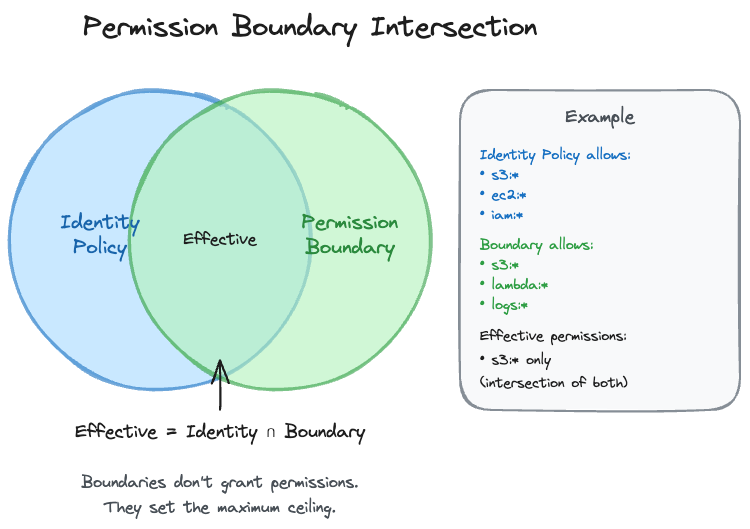
Permission boundaries solve the delegation problem: how do you let developers create IAM roles without letting them create admin roles?
The Delegation Problem
You want developers to create Lambda execution roles for their functions. But you don’t want them creating roles with admin access or roles that can modify IAM itself.
How Boundaries Work
Effective Permissions = Identity Policy ∩ Permission BoundaryThe intersection means a permission must be allowed by BOTH the identity policy AND the boundary. The boundary sets a ceiling that can never be exceeded.
Creating a Permission Boundary
{
  "Version": "2012-10-17",
  "Statement": [
    {
      "Effect": "Allow",
      "Action": [
        "s3:*",
        "dynamodb:*",
        "lambda:*",
        "logs:*",
        "sqs:*",
        "sns:*"
      ],
      "Resource": "*"
    },
    {
      "Effect": "Deny",
      "Action": [
        "iam:*",
        "organizations:*",
        "account:*"
      ],
      "Resource": "*"
    }
  ]
}
This boundary allows common application services but blocks IAM, Organizations, and Account management.
Applying the Boundary
# Apply to an existing role
aws iam put-role-permissions-boundary \
  --role-name DeveloperRole \
  --permissions-boundary arn:aws:iam::123456789012:policy/DeveloperBoundary

# Apply to an existing user
aws iam put-user-permissions-boundary \
  --user-name developer \
  --permissions-boundary arn:aws:iam::123456789012:policy/DeveloperBoundary
Forcing Boundaries on Created Roles
You can also require developers to attach boundaries to any roles they create:
{
  "Version": "2012-10-17",
  "Statement": [
    {
      "Effect": "Allow",
      "Action": [
        "iam:CreateRole",
        "iam:DeleteRole",
        "iam:AttachRolePolicy",
        "iam:DetachRolePolicy",
        "iam:PutRolePolicy",
        "iam:DeleteRolePolicy"
      ],
      "Resource": "arn:aws:iam::123456789012:role/app-*",
      "Condition": {
        "StringEquals": {
          "iam:PermissionsBoundary": "arn:aws:iam::123456789012:policy/DeveloperBoundary"
        }
      }
    },
    {
      "Effect": "Allow",
      "Action": "iam:PassRole",
      "Resource": "arn:aws:iam::123456789012:role/app-*",
      "Condition": {
        "StringEquals": {
          "iam:PassedToService": "lambda.amazonaws.com"
        }
      }
    }
  ]
}
This policy says:
- Developers can create/modify roles that start with
app- - But only if those roles have the DeveloperBoundary attached
- They can only pass roles to Lambda
Any role the developer creates will be constrained by the same boundary they’re constrained by. Privilege escalation blocked.
Boundary vs SCP
| Aspect | Permission Boundary | SCP |
|---|---|---|
| Scope | Single identity | Entire account/OU |
| Applied to | Users, Roles | Accounts |
| Grants permissions | No | No |
| Management account exempt | N/A | Yes |
Service Control Policies (SCPs)
SCPs are organization-level guardrails. They set the maximum permissions available to an entire account.
SCP Fundamentals
SCPs don’t grant permissions. They only restrict what’s possible. This is important to understand because you can’t use an SCP to give someone access. You can only use it to take away access that would otherwise be granted.
SCPs affect all principals in the account, including the root user. This makes them powerful guardrails. However, the management account is exempt from SCPs, which is why you should never run workloads in the management account.
SCPs are evaluated before identity and resource policies. If an SCP denies something, it doesn’t matter what your IAM policy says.
SCP Strategy: Deny List vs Allow List
Deny List approach (block specific actions):
{
  "Version": "2012-10-17",
  "Statement": [
    {
      "Effect": "Deny",
      "Action": ["organizations:LeaveOrganization"],
      "Resource": "*"
    }
  ]
}
This blocks leaving the organization but allows everything else.
Allow List approach (only permit specific actions):
{
  "Version": "2012-10-17",
  "Statement": [
    {
      "Effect": "Allow",
      "Action": ["ec2:*", "s3:*", "lambda:*", "rds:*"],
      "Resource": "*"
    }
  ]
}
This allows only EC2, S3, Lambda, and RDS. Everything else is implicitly denied.
Most organizations use deny lists because they’re easier to manage and don’t break things unexpectedly.
Common SCP Patterns
Region restriction:
{
  "Version": "2012-10-17",
  "Statement": [
    {
      "Effect": "Deny",
      "Action": "*",
      "Resource": "*",
      "Condition": {
        "StringNotEquals": {
          "aws:RequestedRegion": ["us-east-1", "us-west-2", "eu-west-1"]
        }
      }
    }
  ]
}
Prevent disabling security services:
{
  "Version": "2012-10-17",
  "Statement": [
    {
      "Effect": "Deny",
      "Action": [
        "guardduty:DeleteDetector",
        "guardduty:DisassociateFromMasterAccount",
        "securityhub:DisableSecurityHub",
        "config:DeleteConfigurationRecorder",
        "cloudtrail:DeleteTrail",
        "cloudtrail:StopLogging"
      ],
      "Resource": "*"
    }
  ]
}
SCP Inheritance
SCPs flow down the organizational hierarchy:
Root → OU → Nested OU → AccountEffective permissions = intersection of all SCPs in the path. If any SCP in the chain denies something, it’s denied.
If you’re using allow-list SCPs, you need an explicit Allow at every level.
IRSA: IAM Roles for Service Accounts
IRSA gives Kubernetes pods AWS permissions without storing credentials. It’s the standard pattern for EKS workloads.
The Problem IRSA Solves
Before IRSA, giving pods AWS access meant either using the node’s IAM role (which gives every pod on that node the same permissions, way too broad) or injecting credentials into the pod (risky because credentials can leak and don’t rotate automatically).
IRSA provides per-pod IAM roles using OIDC federation. Each pod gets only the permissions it needs, credentials rotate automatically, and there’s nothing to leak.
How IRSA Works
Pod with ServiceAccount
    → Kubernetes injects OIDC token
    → Pod calls STS AssumeRoleWithWebIdentity
    → STS validates token with EKS OIDC provider
    → Temporary credentials returned
    → Pod accesses AWS services
This is AssumeRoleWithWebIdentity from Part 2, implemented specifically for Kubernetes.
Setting Up IRSA
1. Associate OIDC provider with EKS cluster:
eksctl utils associate-iam-oidc-provider \
  --cluster my-cluster \
  --approve
2. Create IAM role with trust policy:
{
  "Version": "2012-10-17",
  "Statement": [
    {
      "Effect": "Allow",
      "Principal": {
        "Federated": "arn:aws:iam::123456789012:oidc-provider/oidc.eks.us-east-1.amazonaws.com/id/EXAMPLED539D4633E53DE1B716D3041E"
      },
      "Action": "sts:AssumeRoleWithWebIdentity",
      "Condition": {
        "StringEquals": {
          "oidc.eks.us-east-1.amazonaws.com/id/EXAMPLED539D4633E53DE1B716D3041E:sub": "system:serviceaccount:default:my-service-account",
          "oidc.eks.us-east-1.amazonaws.com/id/EXAMPLED539D4633E53DE1B716D3041E:aud": "sts.amazonaws.com"
        }
      }
    }
  ]
}
That condition matters. It restricts which ServiceAccount in which namespace can assume the role.
3. Create ServiceAccount with annotation:
apiVersion: v1
kind: ServiceAccount
metadata:
  name: my-service-account
  namespace: default
  annotations:
    eks.amazonaws.com/role-arn: arn:aws:iam::123456789012:role/MyPodRole
4. Use the ServiceAccount in your Pod:
apiVersion: v1
kind: Pod
metadata:
  name: my-pod
spec:
  serviceAccountName: my-service-account
  containers:
  - name: my-container
    image: my-image
IRSA vs EKS Pod Identity
AWS introduced Pod Identity as a simpler alternative to IRSA:
| Aspect | IRSA | Pod Identity |
|---|---|---|
| Setup | More complex | Simpler |
| OIDC provider | Required | Not required |
| Cross-account | Supported | Supported |
| Works outside EKS | Yes (any OIDC) | No |
For the exam, know both. IRSA is more established and works anywhere OIDC is supported. Pod Identity is simpler but EKS-specific.
Identity-Based vs Resource-Based Policies
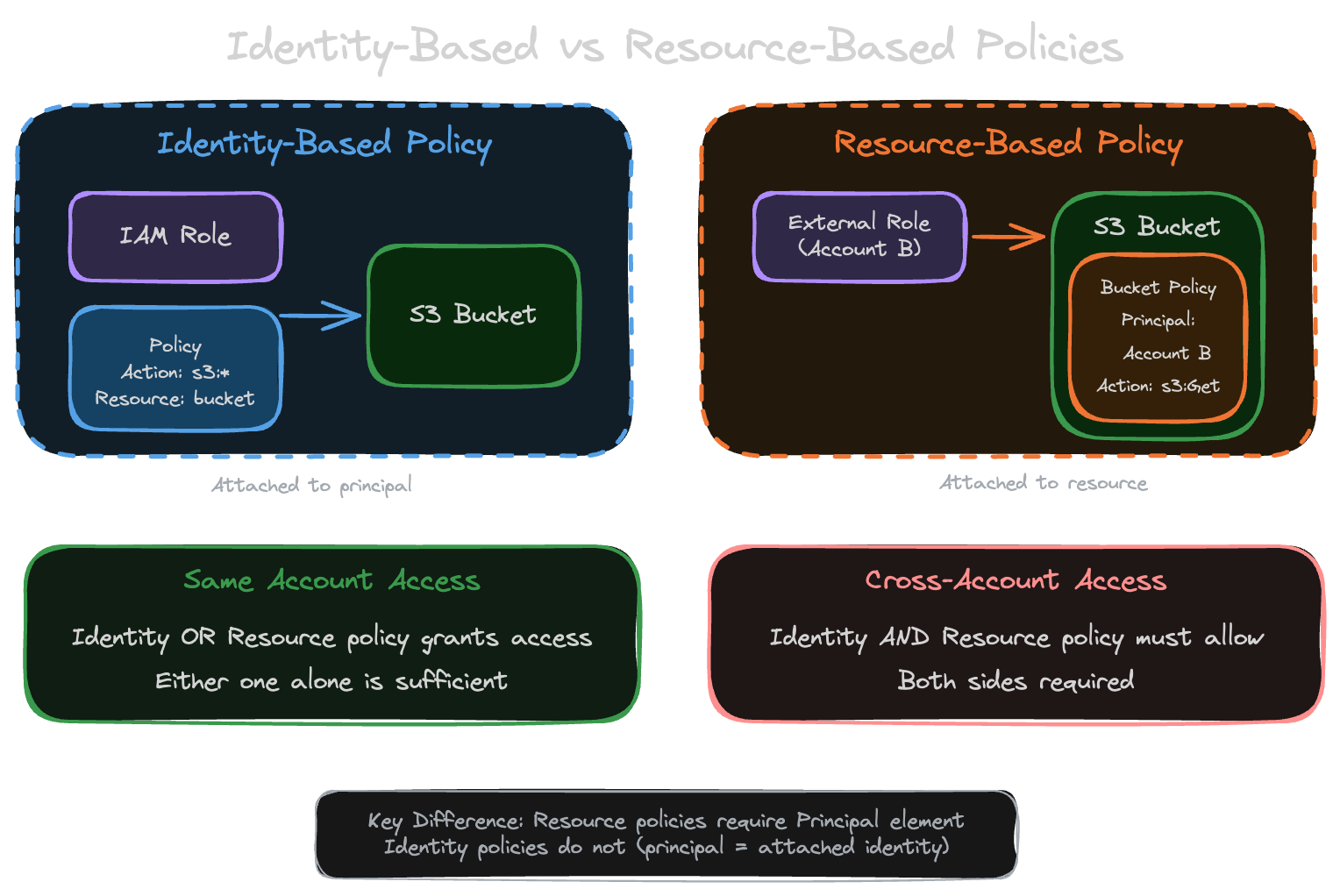
People mix these up all the time, and the exam loves testing the difference. Especially the cross-account behavior.
Identity-Based Policies
Identity-based policies attach to users, groups, or roles. They say “this principal can do these things.”
No Principal element in these policies because the principal is implied, it’s whoever the policy is attached to. You specify Resource to control what gets accessed. One thing to remember: when a user assumes a role, their original identity policies don’t follow them. Only the assumed role’s policies apply.
{
  "Version": "2012-10-17",
  "Statement": [{
    "Effect": "Allow",
    "Action": ["s3:GetObject", "s3:PutObject"],
    "Resource": "arn:aws:s3:::my-bucket/*"
  }]
}
This policy attached to a role says “this role can read and write objects in my-bucket.”
Resource-Based Policies
Resource-based policies live on the resource itself. S3 bucket policies, KMS key policies, Lambda resource policies. They answer a different question: “who can access this resource?”
These require a Principal element because you need to specify who’s allowed in. The Resource is implicit since the policy is already attached to the resource. The big reason you’d pick a resource-based policy over an identity-based one: cross-account access without role assumption. The caller keeps their own identity and permissions. No sts:AssumeRole needed.
{
  "Version": "2012-10-17",
  "Statement": [{
    "Effect": "Allow",
    "Principal": {
      "AWS": "arn:aws:iam::111111111111:role/DataProcessor"
    },
    "Action": ["s3:GetObject"],
    "Resource": "arn:aws:s3:::my-bucket/*"
  }]
}
This bucket policy says “the DataProcessor role from account 111111111111 can read objects from this bucket.”
Same-Account vs Cross-Account Access
This is where people get tripped up on the exam.
For same-account access, either an identity policy OR a resource policy can grant access. Either one alone is sufficient. If your identity policy allows S3 access and the bucket has no policy, you’re in.
Cross-account access is stricter. Both the identity policy AND the resource policy must allow the access. Both sides must explicitly permit it. Miss either one and you get AccessDenied.
Same Account:
  Identity Policy ALLOWS  →  ACCESS GRANTED
  Resource Policy ALLOWS  →  ACCESS GRANTED

Cross Account:
  Identity Policy ALLOWS + Resource Policy ALLOWS  →  ACCESS GRANTED
  Identity Policy ALLOWS + Resource Policy MISSING →  ACCESS DENIED
  Identity Policy MISSING + Resource Policy ALLOWS →  ACCESS DENIED
Services Supporting Resource-Based Policies
Not all services support resource-based policies:
| Service | Resource Policy Name | Cross-Account? |
|---|---|---|
| S3 | Bucket policy | Yes |
| KMS | Key policy (required) | Yes |
| Lambda | Resource policy | Yes |
| SQS | Queue policy | Yes |
| SNS | Topic policy | Yes |
| API Gateway | Resource policy | Yes |
| Secrets Manager | Resource policy | Yes |
| ECR | Repository policy | Yes |
| EventBridge | Event bus policy | Yes |
The KMS Special Case
KMS is unique: key policies are REQUIRED. You cannot use identity-based policies alone for KMS access.
Even if your identity policy allows kms:Decrypt, the key policy must also allow it:
{
  "Version": "2012-10-17",
  "Statement": [
    {
      "Effect": "Allow",
      "Principal": {
        "AWS": "arn:aws:iam::123456789012:root"
      },
      "Action": "kms:*",
      "Resource": "*"
    }
  ]
}
This key policy enables IAM policies in the account to control access. Without this (or explicit principal permissions), identity policies are ignored.
When to Use Each
For same-account access, identity-based policies are usually simpler. Permissions follow the user or role, you can manage them centrally, and they work across multiple resources without duplicating logic.
Resource-based policies are the better choice when you need cross-account access without making the caller assume a role. Service integrations like Lambda triggers from S3 or EventBridge rules also need resource-based policies. If you have one resource that 15 different accounts need to write to (like a central logging bucket), a resource policy on that bucket is way easier than managing 15 sets of role assumptions.
How I Think About the Choice
Developer needs S3 access in the same account? Identity policy, keep it simple. Partner account needs to read from your S3? Resource policy, saves them from assuming a role. Lambda triggered by S3 events? Resource policy, that’s how service integrations work. EC2 instance hitting DynamoDB? Identity policy on the instance role. Central logging bucket that 20 accounts write to? Resource policy, no question. KMS? Both, always. KMS requires a key policy no matter what your identity policies say.
Exam Notes
Know condition operators and when to use each. StringLike for wildcards, IpAddress for CIDR ranges, Null for checking key existence.
ABAC uses aws:PrincipalTag, aws:ResourceTag, and aws:RequestTag. The policy pattern uses ${aws:PrincipalTag/key} syntax.
Permission boundaries intersect with identity policies. Effective = Identity ∩ Boundary.
SCPs don’t grant permissions, only restrict. Management account is exempt. Evaluated before other policies.
KMS requires key policies. Identity-only doesn’t work.
IRSA uses AssumeRoleWithWebIdentity with EKS OIDC provider.
Part 3 of 4 in the AWS IAM Security Deep Dive series.