Building an AWS Data Perimeter, Part 1: Design, Org Bootstrap, and Infrastructure
The question that keeps coming up in security reviews is some variation of: “if someone outside our org gets hold of valid AWS credentials, what actually stops them from reading this bucket?” In most environments the honest answer is the bucket policy, and only the bucket policy. SCPs don’t constrain principals outside your organization. IAM policies on the principal side belong to whoever owns the principal. Bucket policies are per-resource and drift the moment a developer creates a new bucket without copying the deny block.
Resource Control Policies, which AWS launched in November 2024 and expanded through 2025 and into 2026, are the answer to that question at the org level. They are SCPs for the resource side of the request. Combined with the new VPC endpoint org conditions (aws:VpceOrgID, released August 2025), they let you write the answer down once at the OU level and stop defending it bucket-by-bucket.
This is Part 1. It covers the design decisions, org bootstrap, and infrastructure build. Part 2 covers the policy attachments and denial tests against an external account.
The Architecture
Three concentric layers, each mapped to a specific AWS control type:
- Identity perimeter (SCPs): Internal principals cannot act on resources outside our org. An IAM role in workload-a cannot write to a bucket in a foreign org, even if that bucket has a permissive policy.
- Resource perimeter (RCPs): External principals cannot act on our resources. An attacker with credentials from outside the org cannot call
s3:GetObjecton our bucket, even if the bucket policy accidentally allows it. - Network perimeter (VPC endpoint policies +
aws:VpceOrgID): Traffic through VPC endpoints is restricted to org-owned principals targeting org-owned resources. A non-org endpoint cannot be used to route traffic to our buckets.
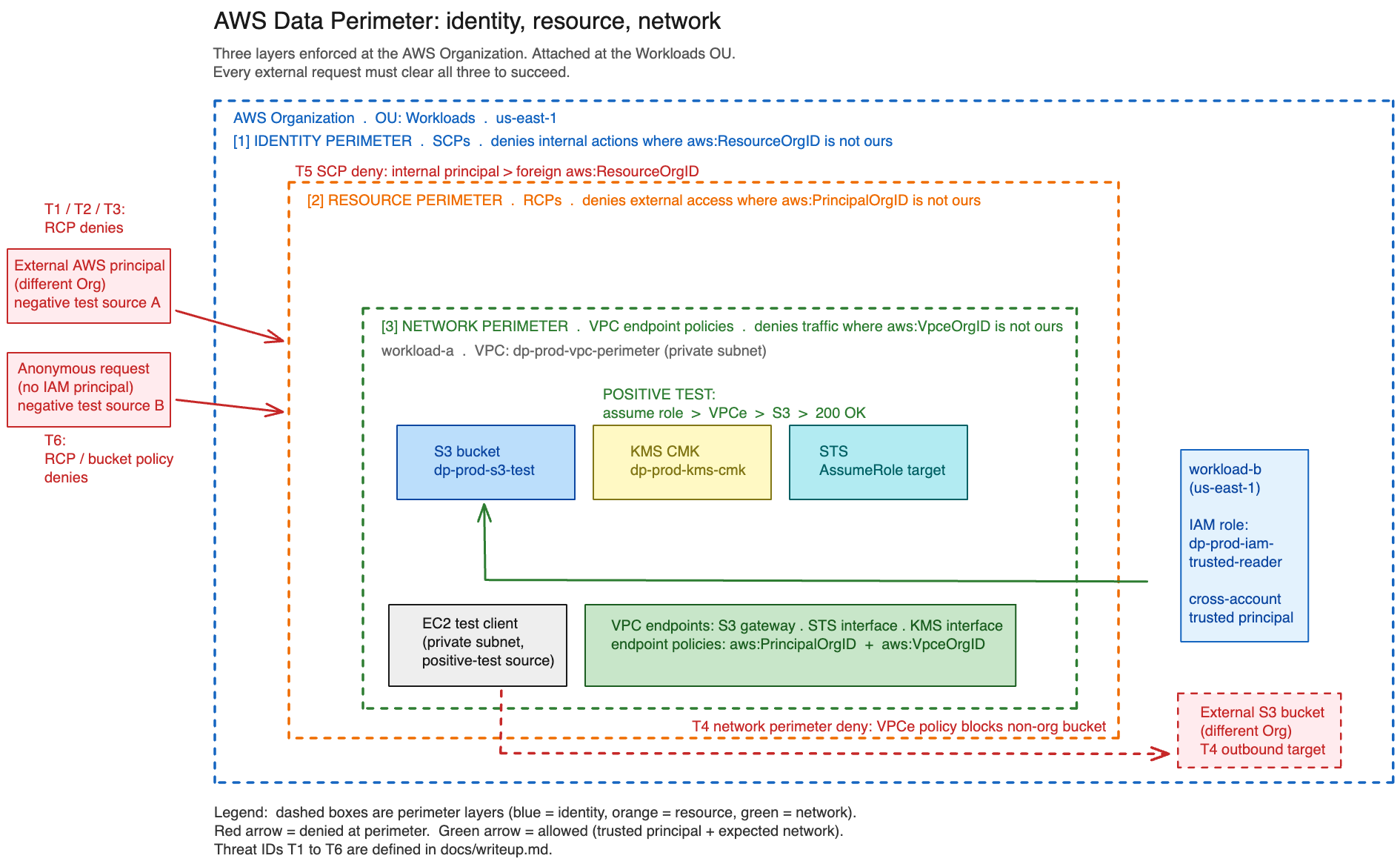
The test surface: one S3 bucket, one KMS CMK, one cross-account IAM role in a second member account, one EC2 instance in a private subnet with no internet gateway. The positive test proves the trusted path works through all three layers. The negative tests prove an external account with valid credentials and explicit IAM permissions still gets denied.
The Decision That Mattered: Where to Attach the RCPs
Before any console clicks, the attachment point for the RCPs had to be settled. Three options:
| Option | Where | Tradeoff |
|---|---|---|
| Attach at root | Every account including management | Catches everything, but a bad RCP applied to the management account has real lockout risk. The management account hosts billing, the org trail, and break-glass paths. |
| Attach at the Workloads OU | Only the two workload accounts | Smaller blast radius. Management account stays outside the perimeter. An attacker who pivots to the management account is not contained. |
| Attach per account | Only where attached | Most surgical, worst drift profile. Every new account needs the policy reapplied or it silently bypasses the perimeter. |
I picked the Workloads OU. The management account is MFA-protected, has no production workloads, and is only accessed by one person. Adding RCPs there does not meaningfully reduce attack surface, but it does add a real lockout risk if the policy is authored wrong. The Workloads OU is where the actual data lives and where unknown third parties might someday end up with valid credentials. That is where the perimeter belongs.
The acknowledged gap from this choice: management account compromise is not contained by this perimeter. That is a separate problem for a future Identity Center project, not something to smear across this one.
Phase 1: Bootstrapping the AWS Organization
The first irreversible decision in this project is converting a standalone AWS account into an Organization management account. Once that happens, the account can never become a member account of any org again. AWS will let you delete the org, but the account carries that history.
For a personal portfolio account with one user, no business workloads, and an MFA-protected root user, this was acceptable. The mitigation that made it so: root has no programmatic access keys, has a long random password in a password manager, and is used only for actions that genuinely require root.
Budget alarm first. Before enabling Organizations all-features, a $30/month budget with an 80% actual-spend alert goes in. The reason: as soon as a member account exists, it can spend money. The budget must exist before the member accounts do. This is not a complicated decision, but it is one most tutorials get backwards.
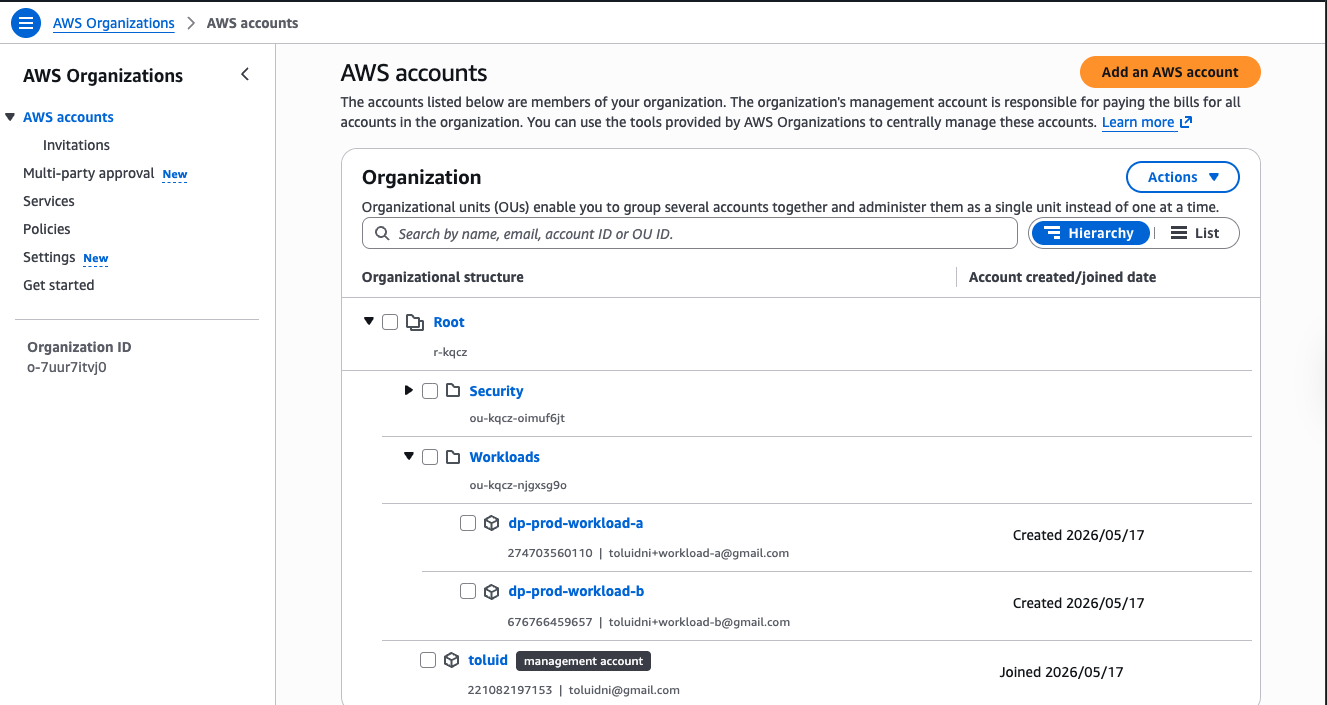
The org ended up with this shape:
- Management account:
toluid(2210XXXXXXXX): stays at root, never inside any OU - OU:
Workloads(ou-XXXX-XXXXXXXXXX): SCP and RCP attachment point - OU:
Security(ou-XXXX-YYYYYYYYYY): empty placeholder for a future log-archive account - Member:
dp-prod-workload-a(2747XXXXXXXX): VPC, EC2, S3 bucket, KMS key - Member:
dp-prod-workload-b(6767XXXXXXXX): trusted cross-account IAM role
A gotcha with the console: root users cannot use the Switch Role feature in the AWS console. Switch Role is an IAM user feature. With no IAM users in the management account (deleted during a previous cleanup), the only way to access member accounts directly was to sign in as each member account’s root user. That meant setting a fresh password on each member-account root via the Forgot Password flow, signing in, confirming the account works, signing out. The OrganizationAccountAccessRole still exists in each member account and works fine for any IAM caller with sts:AssumeRole; root just cannot be that caller.
CLI validation confirmed the final state:
$ aws organizations describe-organization --query 'Organization.[Id,FeatureSet]'
o-XXXXXXXXXX   ALL

$ aws organizations list-accounts-for-parent --parent-id ou-XXXX-XXXXXXXXXX \
    --query 'Accounts[*].[Name,Status]' --output table
| dp-prod-workload-a | ACTIVE |
| dp-prod-workload-b | ACTIVE |
Phase 2: Core Infrastructure
With the org structure in place, Phase 2 builds the test substrate. No policies are attached yet. The goal is a known-good baseline that Phase 3 can deploy controls on top of.
Management account: A KMS CMK (dp-prod-kms-cloudtrail) for encrypting trail logs, an S3 bucket (dp-prod-s3-cloudtrail-2210XXXXXXXX) for log storage, and an org-wide CloudTrail trail (dp-prod-trail-org) covering all member accounts, all regions, with log file validation on and SSE-KMS encryption. This trail will later record the Phase 4 denial events.
workload-a: A VPC (dp-prod-vpc-perimeter, 10.0.0.0/16) with no internet gateway; traffic in and out travels only through VPC endpoints. One private subnet in us-east-1a. Six VPC endpoints: one S3 gateway (free), and interface endpoints for STS, KMS, SSM, SSM Messages, and EC2 Messages. The SSM-family endpoints are what allow Session Manager to connect to the EC2 instance without a bastion host or public IP.
A KMS CMK (dp-prod-kms-cmk) and an S3 test bucket (dp-prod-s3-test-2747XXXXXXXX) with SSE-KMS encryption, versioning on, and all public access blocked. An IAM instance profile (dp-prod-role-ec2-test-client) with the SSM managed policy and inline permissions for S3 and KMS. An EC2 instance (dp-prod-ec2-test-client, AL2023, t3.micro) in the private subnet with no key pair, connected via Session Manager.
workload-b: A single IAM role (dp-prod-iam-trusted-reader) with a trust policy allowing the workload-a EC2 instance role to assume it. This role will be the positive-test cross-account caller in Phase 4.
One test object (test.txt) uploaded to the S3 bucket via Session Manager:
$ echo "data-perimeter-test-object" | aws s3 cp - \
    s3://dp-prod-s3-test-2747XXXXXXXX/test.txt \
    --sse aws:kms --sse-kms-key-id alias/dp-prod-kms-cmk
upload: - to s3://dp-prod-s3-test-2747XXXXXXXX/test.txt
The KMS key policy trap. The natural instinct when authoring a custom KMS key policy is to paste a complete JSON document into the editor. AWS rejects this with MalformedPolicyDocumentException: The new key policy will not allow you to update the key policy in the future. The reason: the default key policy includes an Enable IAM User Permissions statement that delegates authorization to IAM, and without it, the key locks itself out of future modifications. The fix is to append custom statements, never replace the default policy entirely.
S3 bucket policy principal validation. S3 validates principal ARNs in bucket policies at save time, not evaluation time. If a policy references an IAM role that does not yet exist, the save fails with Invalid principal in policy. The bucket policy in Phase 2 referenced both the EC2 instance role and the workload-b trusted-reader role. The sequencing requirement: create both roles first, then save the bucket policy. There is no “create eventually consistent” mode.
DNS hostnames for interface endpoints. Creating the STS interface endpoint with private DNS enabled failed until enableDnsHostnames was turned on for the VPC. VPCs created in “VPC only” mode have DNS support on but DNS hostnames off by default. Without hostname resolution, calls inside the VPC continue resolving sts.us-east-1.amazonaws.com to the public STS endpoint, silently bypassing the endpoint and making the VPC endpoint policy meaningless.
End of Phase 2 state confirmed via CLI:
$ aws ec2 describe-vpc-endpoints --filters "Name=vpc-id,Values=$VPC_ID" \
    --query 'VpcEndpoints[*].[ServiceName,State]' --output table
| com.amazonaws.us-east-1.s3          | available |
| com.amazonaws.us-east-1.sts         | available |
| com.amazonaws.us-east-1.kms         | available |
| com.amazonaws.us-east-1.ssm         | available |
| com.amazonaws.us-east-1.ssmmessages | available |
| com.amazonaws.us-east-1.ec2messages | available |
All six endpoints available. Session Manager connected. Trail logging. Test object present. The substrate is built.
What’s Next
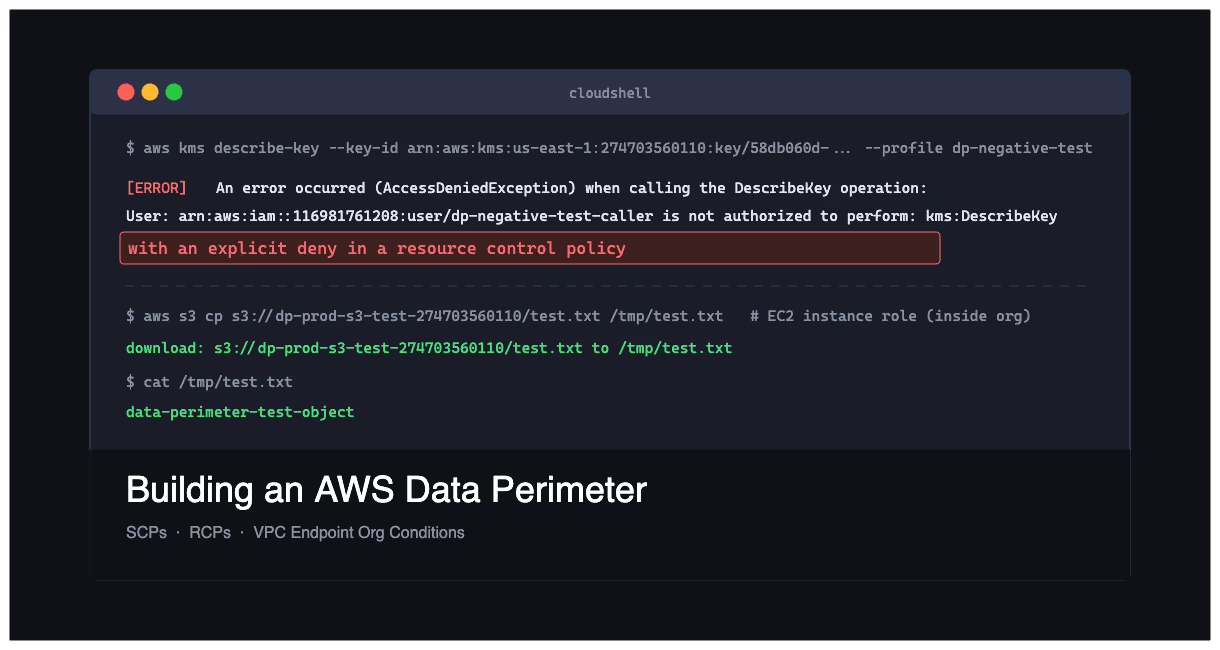
Part 2 covers the policy attachments (SCP, RCP, VPC endpoint policies, bucket policy aws:VpceOrgID condition) and the validation tests against an external AWS account with explicit IAM permissions to attempt the denied actions. The headline evidence is a KMS call returning with an explicit deny in a resource control policy from a caller that had every right to ask.
The full source is in the project repo. Phase 3 runbook, policy JSON, and Phase 4 evidence are all there.